


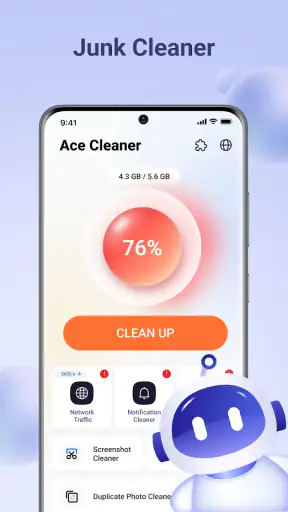
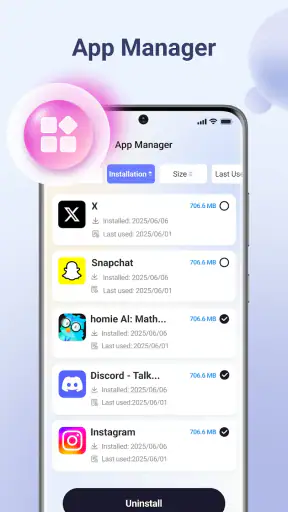
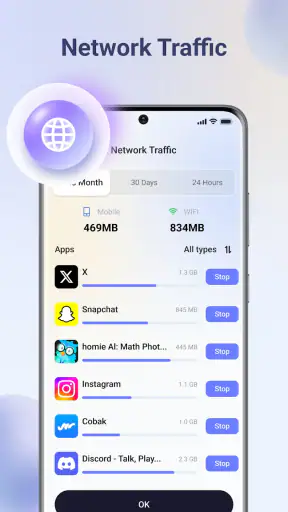
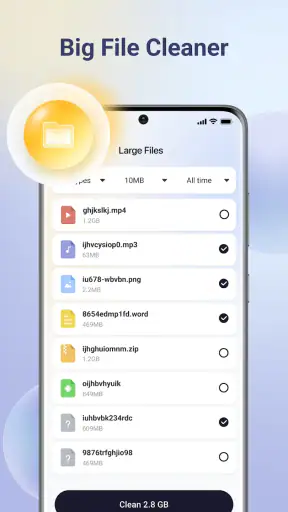

When my phone starts feeling crowded, I usually do not need another complicated dashboard. I need to find the files that are taking up space, decide what is safe to remove, and put the rest into a sensible order. That is the problem Ace Cleaner tries to solve. It is a free tools app from Veristocop18, aimed at cleaning unwanted files while helping organize photos, videos, and documents.
After spending time with it, I see its main value less as a dramatic “speed boost” and more as a practical cleanup routine. The useful part is having several types of personal content brought into one place instead of jumping between a file manager, gallery, and storage settings. It is available for Everyone and works on devices running Android 7.0 or later, so its audience is broad, especially among people using older or entry-level phones that become cluttered quickly.
The app has a 3.6 average from around 5.1 thousand ratings, with over 5 million installs. Those figures suggest that many people are willing to try a straightforward cleaner, although the rating also tells me not to treat it as a perfect solution for every storage problem. My experience matches that middle ground: Ace Cleaner can make routine housekeeping easier, but it still requires attention before deleting anything important.
Cleaning is the feature that matters most
The strongest idea here is simple: use one tool to locate junk files and then deal with the personal media and documents that tend to accumulate around them. Temporary leftovers, old downloads, repeated screenshots, large videos, and forgotten documents often live in different folders. Even when the phone has its own storage screen, finding the files that can actually be removed may take patience.
Ace Cleaner gives that task a more approachable starting point. Instead of treating storage as an abstract bar, I can think in terms of the things I recognize: pictures, videos, and documents. That distinction matters because a file’s usefulness is usually easier to judge from its type and context than from its filename alone.
I would not describe the app as a replacement for careful file management. Its cleaning function is most helpful when it narrows down the mess. I still want to inspect results before confirming a deletion, particularly when a folder contains work files, travel pictures, downloaded tickets, or media saved for offline use.
The real benefit is not deleting faster; it is making the decision easier to see. That is an important difference. A cleaner that removes aggressively may free space quickly, but it can also create regret. Ace Cleaner is more useful when I treat it as a visual checklist for storage rather than as a button I press without reading.
What the workflow feels like
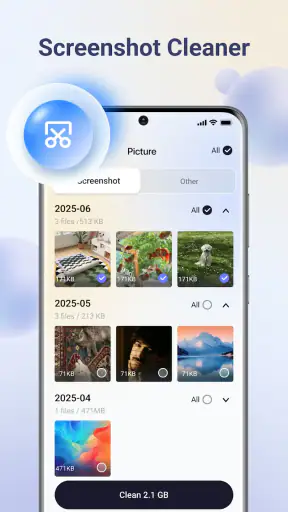
My preferred routine begins with a scan, followed by a pause. I look at the categories the app presents and start with material I already recognize as disposable. Old screenshots are a good example because they often capture a temporary message, a delivery status, or a setting I needed only once. They are easier to judge than a folder full of unnamed files.
Next, I review videos. They deserve special attention because a few large clips can matter more than a long list of small files. I check whether a recording is a duplicate, whether it has already been shared, and whether it is still needed offline. This is where a cleaner can save time, but also where careless approval can cause the most frustration.
Documents require a slower approach. A document may look old and still be important, especially if it contains a receipt, a form, a school assignment, or information that is difficult to recover. I use the app’s organization angle to locate these files, but I do not assume that age equals junk. The best workflow is selective: remove obvious clutter first, then return later for anything uncertain.
One useful habit is to clean in small sessions rather than waiting until storage is nearly full. A short review after a busy week of taking pictures or downloading files is less tiring than trying to understand months of accumulated content in one sitting. Ace Cleaner fits that habit because its purpose is easy to remember: open it when the phone feels crowded, inspect the categories, and make deliberate choices.
A realistic everyday use case
Imagine preparing for a weekend trip with limited free space. You want to take photos, download maps, keep a few videos available, and save travel documents. The phone warns that storage is running low, but the problem is not obvious from the home screen. You open Ace Cleaner and begin with screenshots and old downloads, then review large videos that have already been backed up elsewhere.
That sequence is more sensible than deleting random applications. It preserves the apps you need for the trip while targeting files that are easier to replace or no longer useful. Afterward, you can organize the documents you still need so that boarding information, reservations, and identification scans are not mixed with disposable downloads.
This is where the app’s combined focus makes sense to me. A basic storage settings page may show what is large, while a gallery may show what is visual, but Ace Cleaner is designed around the cleanup decision itself. It does not remove the need for judgment, yet it can reduce the time spent hunting through unrelated folders.
Small habits that improve the result
I recommend starting with files that have an obvious reason to disappear. Screenshots of one-time information, duplicate downloads, and videos that have already been sent are safer first targets than personal photographs or documents. This gives the cleanup a quick win without turning the first session into a stressful audit.
I also separate “freeing space now” from “organizing everything.” Those are related but different jobs. If the phone is almost full, I focus on large, disposable media. If storage is manageable, I spend more time sorting documents and deciding what should remain accessible. Trying to do both at once can make the app feel more demanding than it needs to be.
A third tip is to use the app as a prompt to review your storage habits. If the same type of file repeatedly appears in the cleanup list, the long-term solution may be changing where downloads go or removing content soon after it stops being useful. Ace Cleaner can expose the symptom, but it cannot replace a personal system for keeping files under control.
Where the convenience meets its limits
The biggest trade-off is that convenience can make deletion feel safer than it really is. A categorized list is helpful, but categories do not understand the personal value of every file. A video may be large and rarely opened while still being meaningful. A document may be old but required for a future task. I would always review names, previews, and context before confirming removal.
Another limitation is that a cleaner cannot solve every reason a phone feels slow or full. If applications, system data, or offline content are the main cause, focusing on photos and documents may not produce the result you expect. In that situation, the phone’s own storage settings may give a more complete explanation of what is consuming space.
There is also a difference between organizing files and backing them up. Ace Cleaner can help me identify content worth reviewing, but I would not treat a cleanup session as a backup strategy. Important pictures and documents should already exist somewhere safe before I remove anything. This is especially important for people who use their phone as their only copy of personal records.
Compared with a standard file manager, Ace Cleaner feels more focused on the cleanup moment and less like a complete manual filing cabinet. A file manager is better when I already know the exact folder or filename I want. Compared with a gallery app, Ace Cleaner is more useful when the problem is storage rather than viewing memories. Compared with built-in device tools, its appeal is the clearer emphasis on cleaning and organizing several content types together.
Those comparisons also show when I would choose something else. If I need detailed folder permissions, advanced transfers, or precise control over obscure directories, I would use a dedicated file manager. If I mainly want to browse and edit pictures, a gallery application is the better fit. If my phone offers a strong built-in storage analyzer, I would compare its suggestions before adding another tool.
Questions I would consider before installing it
For someone wondering whether it is safe to use, my answer is: it can be used responsibly if you review the items before deletion. I would not approve a broad cleanup automatically, particularly on a phone containing work records or irreplaceable media. The app helps surface candidates; I remain responsible for the final choice.
If you are asking whether it can replace a file manager, I would say no. Its strength is the guided cleanup of clutter involving photos, videos, and documents. It is not the tool I would pick for detailed folder administration or moving a large personal archive between locations.
If your phone has very little storage, the app may still be useful, but expectations should stay realistic. Removing unnecessary media can create breathing room, yet it will not fix a storage problem caused mainly by large applications or system files. I would first identify the largest category and then decide whether Ace Cleaner addresses that category directly.
People also often want to know whether a free cleaner is worth adding when the phone already includes storage controls. I think the answer depends on how easy those controls are for you to understand. If the built-in tools already show clear, useful recommendations, Ace Cleaner may offer limited extra value. If you find yourself avoiding cleanup because the process is scattered or confusing, its more direct organization can justify keeping it.
The current version is V1.1.8, and the app’s basic positioning remains easy to understand: it is a free Android utility for reducing clutter and bringing commonly neglected file types into view. I appreciate that its usefulness does not depend on learning a complicated system. At the same time, I would keep the app updated through the normal store process and continue to inspect results rather than assuming every suggestion is disposable.
Who will get the most from it
Ace Cleaner is best for people who regularly accumulate screenshots, downloaded media, videos, and documents but do not want to search through folders manually. It is particularly appealing if storage warnings arrive at inconvenient moments and you need a quick way to identify personal files before deleting applications or moving everything to a computer.
It can also suit family members who find technical storage menus intimidating. The focus on recognizable content types makes the cleanup conversation easier: look at pictures, check videos, review documents, and remove only what makes sense. I would still help a less confident user during the first session, because a simple interface does not eliminate the consequences of a wrong choice.
On the other hand, I would skip it if you already maintain a careful folder structure, have plenty of free space, or need professional-grade file controls. I would also avoid relying on it as the only protection for important content. In those cases, a built-in storage tool, a dedicated file manager, or a dependable backup routine may be more appropriate.
My final view is favorable but measured. Ace Cleaner is not magic, and it should not be judged by whether it transforms every phone into a faster device. I judge it by whether it helps me find removable clutter with less effort and fewer blind guesses. On that narrower goal, it is useful. If your phone is crowded with forgotten media and documents, this free tools app is worth trying, provided you keep the final deletion decisions in your own hands.


